
The bottleneck moved
Once the scanner made card images faster, I ran into the next problem almost immediately.
Read the scanner story: https://www.nlcollectibles.com/blog/iphone-card-photos-to-scanner
I could create images in batches, but I was still turning each card into an eBay listing one at a time.
eBay's photo based bulk listing tool could look at the pictures and prepare a starting point. I liked the idea, but I still spent too much time correcting individual cards. What I wanted was not simply faster suggestions. I wanted one file I could review, correct, and reuse across an entire batch.
I was convinced the CSV upload was the answer.
I just could not get the template to work.
I knew the CSV was the answer
Creating one card listing at a time takes more work than it appears.
For every card, I had to connect the pictures, identify the card, write the title, select a category, enter item specifics, choose a condition, set a price, apply the correct business policies, and review everything before publishing.
Doing that once was manageable. Repeating it across a stack of cards was where the time disappeared.
The photo based bulk tool reduced some of the initial typing, but it did not give me the consistency I wanted. Similar cards, different sets, parallels, finishes, item specifics, and condition language could still require careful correction. I was moving some work around, but I was still handling the cards one by one.
The CSV looked less automatic, but it offered something I valued more: structure. If I made a decision about how one type of card should be shipped, named, categorized, or reviewed, I could carry that decision across a batch.
First, I had to make the file work.
Then the errors began
I downloaded an eBay category template, filled in the listing information, and started testing.
Shipping policies were especially confusing. I had trouble understanding which policy belonged in which field, whether eBay wanted a policy name or another value, which entries were case sensitive, and whether the problem was in my spreadsheet or in the way my account was configured.
Some entries that looked reasonable were rejected. Other required information was not obvious from the sheet I had received. An upload could fail even when I thought I had completed everything the template asked for.
Eventually, I gave up.
The bulk upload was supposed to save time, but I had already spent more time trying to understand the file than I would have spent creating several listings manually. It no longer felt like a shortcut. It felt like another system I had to reverse engineer before I could use it.
The comment that changed what I looked for
The breakthrough came before I thought of any of this as a software project.
Somewhere online, I saw someone mention that a downloaded eBay template might not contain every field a particular shipping setup needs. I no longer remember the exact source, but it gave me something new to test.
Until then, I had assumed the template contained everything it needed and that I was filling it out incorrectly.
Now I started looking at the template itself.
Three columns were missing
The spreadsheet I had downloaded ended after Responsible Person 1 ContactURL. The three shipping weight headers I needed were not there:
WeightMajor
WeightMinor
WeightUnit
I did not rebuild the sheet or rearrange its existing columns. I went to the first three empty columns on the right, entered those exact header names, filled in the values for one listing row, and tried the upload again.
It worked.
The fix was small. Finding it was not.
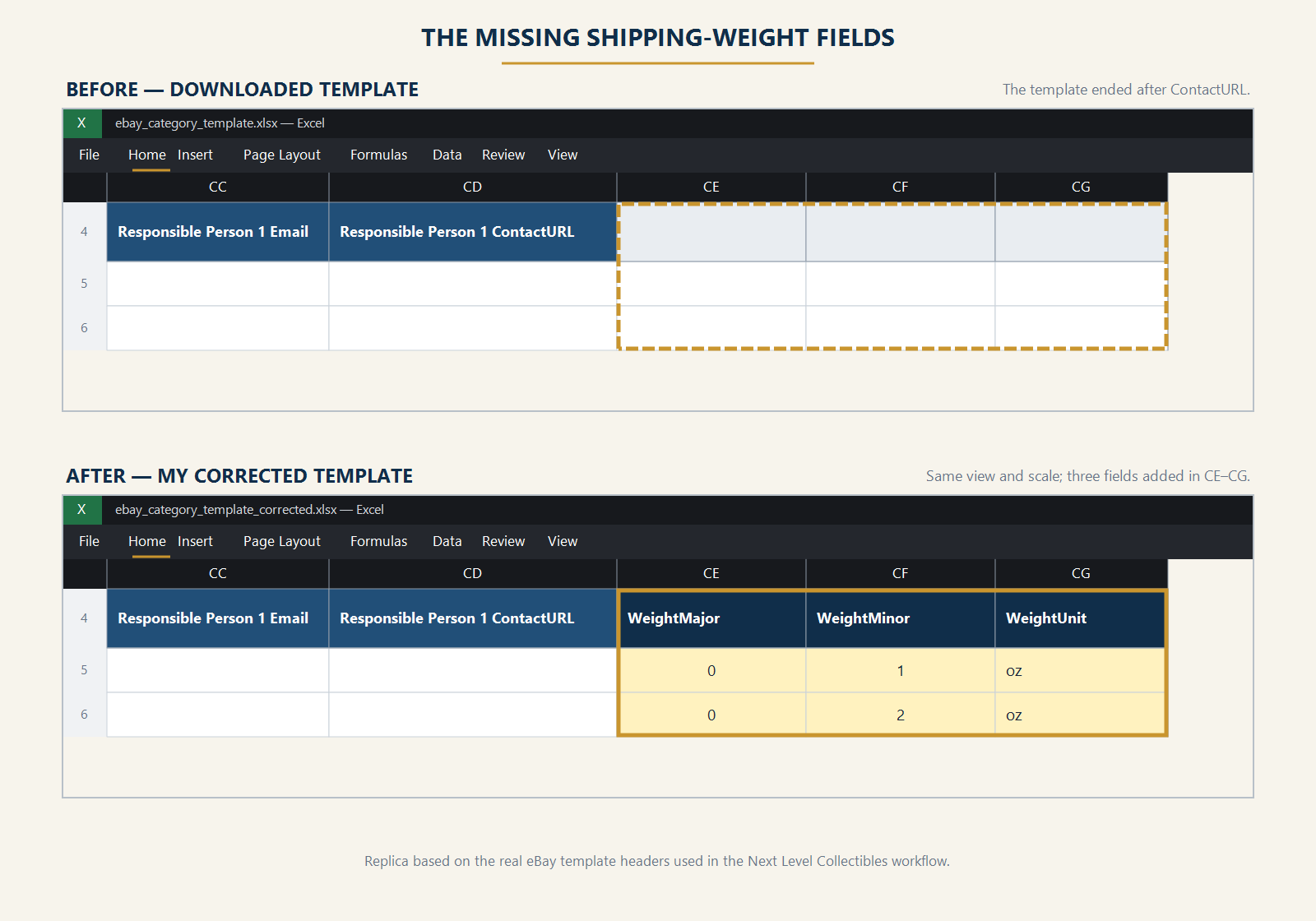
The template I downloaded ended after ContactURL. Adding WeightMajor, WeightMinor, and WeightUnit in the next three columns was the change that finally worked for me. My successful single card row used 0, 1, and oz.
What those fields meant in my file
The names sound more complicated than the information they hold.
WeightMajor was the whole pounds. My value was 0 because the complete mailpiece weighed less than one pound.
WeightMinor was the remaining whole ounces. My value was 1.
WeightUnit identified the weight unit. The value accepted by my working file was oz.
Together, my three cells looked like this:
WeightMajor: 0
WeightMinor: 1
WeightUnit: oz
In plain English, they described a one ounce mailpiece.
I used one ounce because that was what one card in a top loader inside the plain white envelope I used weighed as a complete package. It was not a number I chose for every card. A thicker holder, several cards, extra protection, a bubble mailer, or a different shipping service can change the weight.
The useful lesson is to weigh the complete mailpiece as it will actually be sent. The card, sleeve, holder, protection, envelope, label, and anything else inside all count.
If the same problem happened to me today, I would make one controlled test:
Keep the downloaded template's existing headers in place.
Add WeightMajor, WeightMinor, and WeightUnit in the first unused columns on the right.
Enter the measured weight values for one listing.
Upload that single row before copying anything across a larger batch.
Open the resulting listing and verify that the shipping information is correct.
This is the exact change that worked in my account and file. It is not a promise that the same values will fit every seller, shipping policy, package, or current version of eBay's template.
A note if you are trying this now
I still cannot say with confidence why those fields were absent from the spreadsheet I received.
It may have been the category template or listing flow I selected. It may have been connected to my business policies. It may have been a setup step I misunderstood. eBay may also have changed the template since then.
There is one current difference worth knowing. eBay's Seller Hub Reports bulk listing guide documents WeightMajor as whole pounds, WeightMinor as ounces, and lb as the accepted WeightUnit value for calculated shipping. My historical file was accepted with oz.
Seller Hub Reports bulk listing guide: https://pages.ebay.com/sh/reports/help/create-listings-bulk/
eBay's package dimensions and weight documentation also shows the major value in pounds and the minor value in ounces.
Package dimensions and weight documentation: https://developer.ebay.com/api-docs/user-guides/static/trading-user-guide/shipping-package-size.html
That is why I would not copy an old value blindly. I would compare the current guide with the template available in my own Seller Hub, then test one row before sending a full batch.
Policy names deserve the same care. eBay's current guide says business policy names are case sensitive, so I would copy them directly from the account instead of typing them from memory.
The upload finally worked
Seeing the file accepted changed more than that one listing.
It proved the CSV could become the process I had imagined. I could prepare a batch, inspect it before anything went live, correct the source when something was wrong, and carry consistent decisions from one row to the next.
But one accepted upload did not mean I had mastered the system.
Every new batch seemed to reveal another detail. A policy name had to match. A category expected a particular condition value. Photos needed public URLs. Item specifics varied. A file could be accepted and still create a listing that needed more correction than I wanted.
The difference was that I was no longer starting from zero.
I stopped starting over
When something failed, I tried to isolate the cause. When something worked, I preserved it.
Instead of downloading a fresh template and rebuilding everything each time, I kept the known good structure. I changed only what the next upload required, then saved the result again when it worked.
Slowly, the spreadsheet became more than an eBay form. It became a record of decisions I no longer needed to make from scratch:
Which policy belonged to this kind of card?
Which fields stayed consistent across the batch?
Which facts belonged to one individual card?
What did I need to review before uploading?
That repeatable structure was the real breakthrough. The three missing columns got the file through the door. Preserving the successful result gave me something I could continue building on.
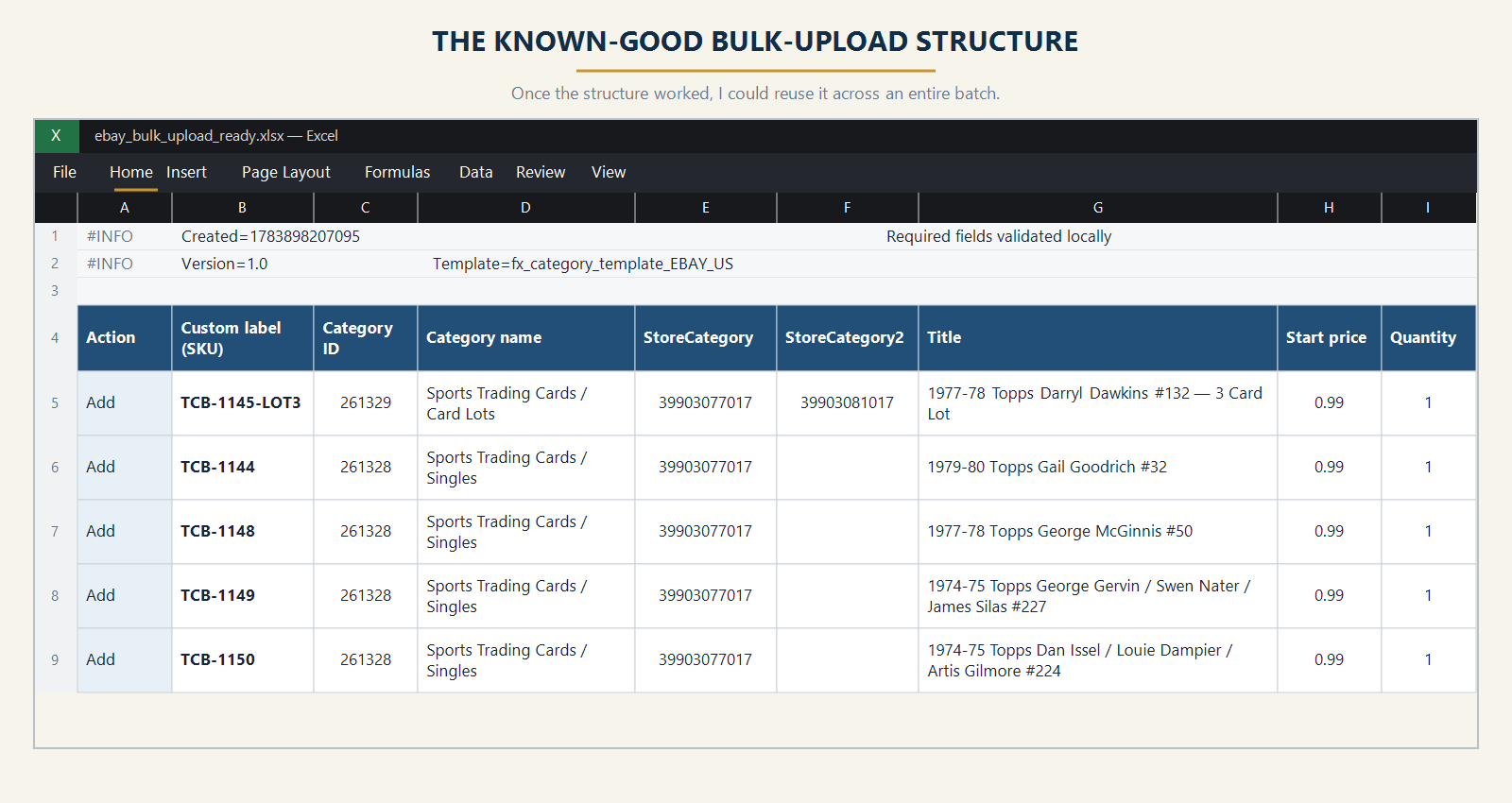
Once I had a structure that worked, I could reuse the consistent fields across a whole batch instead of rebuilding every listing from the beginning.
The next problem was already waiting
The CSV gave me structure, but it did not know which images belonged to which card.
My pictures still lived on my computer. eBay needed image URLs it could reach. I needed to keep every front and back together, connect the correct pair to the correct spreadsheet row, and preserve the order of the physical cards.
The file also needed consistent item identities. Without a permanent number for each card, an image pair, spreadsheet row, physical card, and eventual inventory record could drift apart.
That exposed the next connected problems: hosted image URLs and permanent SKUs.
I may not remember every part of this project in a perfect sequence because several problems overlapped. What I remember clearly is the pattern. Solving one bottleneck made the next one impossible to ignore.
Adding WeightMajor, WeightMinor, and WeightUnit did not build the larger system for me. It proved that a process I had abandoned could be made dependable through testing, careful review, and preserving what worked.
That small breakthrough is where the spreadsheet stopped being an obstacle and started becoming part of the system.
