
I sell both comic books and sports cards, but preparing images for them presents two completely different problems. This part of my story is about the cards.
The scanner gave me a faster, more consistent way to image ordinary sports cards. It was never a solution for comics, and it has not become a perfect bulk solution for every kind of card.
My short answer: a scanner may be part of the solution if photographing ordinary cards one at a time has become a bottleneck. It can make imaging the front and back faster and more consistent. It can also introduce new questions about card safety, feeder reliability, reflective surfaces, file handling, and which scanner is actually right for the job.
This is not a list of instructions for what anyone else should buy. It is what I tried, what improved, where my setup falls short, and what I would research if I were making the decision today.
Jump to a section
My setup at a glance
Scanner: Epson WorkForce ES-400 II document scanner
What I use it for: ordinary sports cards inside penny sleeves
What still gets photographed: reflective, thick, patch, slabbed, delicate, and more valuable cards
Biggest improvement: consistent images of the front and back without staging a separate photo for every side
Biggest limitation: the feeder can pull two cards in penny sleeves at once, so I often feed and supervise them one at a time
Where I stand now: it was a useful first scanner, but it may not be my final scanner
This post is based on equipment I bought and continue to use. It is not sponsored, and the product links are not affiliate links.
The card photography bottleneck
When I decided to start selling part of my collection, I assumed taking pictures would be one of the easier parts.
I already had an iPhone. I found a cabinet with good lighting, positioned each card, and took photos that I was genuinely happy with. The problem was not the quality. The photos looked good.
The problem was everything required to make each one.
I had to position the card, straighten it, adjust the lighting, fight the glare, photograph the front, flip the card, photograph the back, review both images, make any edits, and upload the files manually. Then I had to repeat the whole process for the next card.
That was manageable when I imagined listing a few cards at a time. It stopped making sense when I looked at the amount of inventory I actually wanted to work through.
This was the first real bottleneck I encountered after deciding to sell.
Why I tried a document scanner
At that point, I was not designing the system I have today. I was not comparing every scanner on the market or trying to build the perfect sports card workflow.
I just needed something faster.
I started looking at scanners with automatic feeders because I wanted to stop staging a separate miniature photo shoot for every ordinary card. The machine I eventually bought was the Epson WorkForce ES-400 II High-Speed Color Duplex Desktop Document Scanner.
It is important to call it what it is. Epson sells the ES-400 II as a document scanner, not as a scanner designed specifically for trading cards. Its official product page advertises scanning both sides in one pass, an automatic document feeder that holds 50 sheets, and speeds of up to 35 pages or 70 images per minute for documents.
Official Epson product specifications:
Epson ES-400 II official product page
Those numbers helped the scanner look like a reasonable solution. They are document specifications, not a promise that it will move a stack of trading cards in penny sleeves at those speeds. My real card workflow has never matched the clean, unattended version suggested by a pages per minute number.
I scan ordinary cards while they are inside penny sleeves. I do not put raw cards through the feeder, and I do not treat every card as a candidate for scanning. That is the risk decision I made for my own cards. It should not be mistaken for a trading card method officially supported by Epson.
What the scanner improved
With my phone, the unit of work was one photograph at a time.
With the scanner, imaging became a repeatable production step, even when I still needed to supervise the feed.
I could prepare a group of ordinary cards in penny sleeves, keep them in order, and capture the front and back in one pass. The lighting, background, scale, and alignment no longer changed every time I moved to another card.
That helped in several ways:
Front and back arrived together. I no longer needed to photograph each side separately.
The images were consistent. I was not correcting a new angle, shadow, or background for every card.
I could work in batches. Preparing a group of cards felt different from restarting the entire process for each item.
The files were easier to process later. Consistent images gave me better raw material for the workflow I would eventually build around them.
The consistency mattered almost as much as the speed. I was no longer asking, “How do I take a good picture of this card?” every few minutes. I could concentrate on moving a batch through one repeatable step.
The scanner did not identify the card, determine its condition, choose a price, create an eBay listing, or remember where I stored the physical item. It simply made creating the images more dependable. That was enough to move the larger project forward.
Where the feeder falls short
When I first pictured using a scanner, I imagined loading a stack of cards and letting the machine work through them.
That has not been my experience with cards in penny sleeves.
The feeder can pull two sleeved cards at once. When that happens, a card may not scan as expected and the order of the front and back can be thrown off. To reduce that risk, I often present one card at a time and watch the feeder closely.
It is still faster than photographing every ordinary card. The scanner captures both sides in one pass, produces consistent files, and removes most of the lighting and positioning work. It just is not the unattended bulk process I originally imagined.
This is also why I would not call the Epson ES-400 II “the best card scanner” or recommend it unconditionally for processing large numbers of cards. It was a practical way for me to get started. As my volume and expectations increased, the amount of supervision it needs became another bottleneck.
I am interested in testing a scanner or feeder that might separate cards in penny sleeves more reliably and handle larger groups faster. I have not chosen or tested that replacement yet. A more expensive or more specialized scanner is not automatically safer or better, so any upgrade will need to prove itself with real cards in my actual workflow.
Which cards I scan and which I photograph
The tradeoff became more obvious as I tried different kinds of cards.
Standard cards usually came through cleanly and consistently. Reflective cards were another story. Prizm, silver, holo, and other foil finishes can lose the effect that makes them special. A flat scan may record the card clearly while muting the rainbow or refractor pattern a collector needs to see.
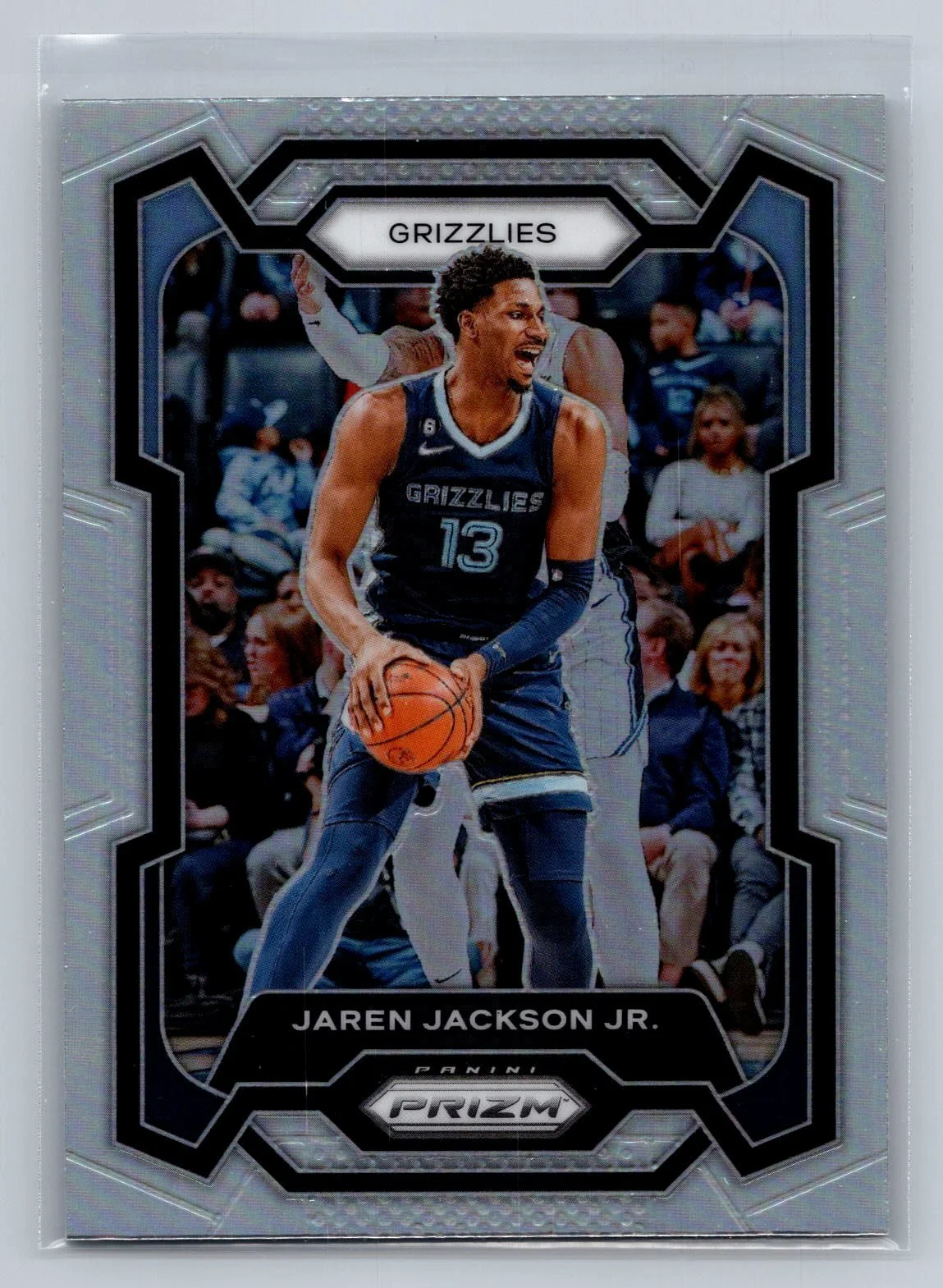
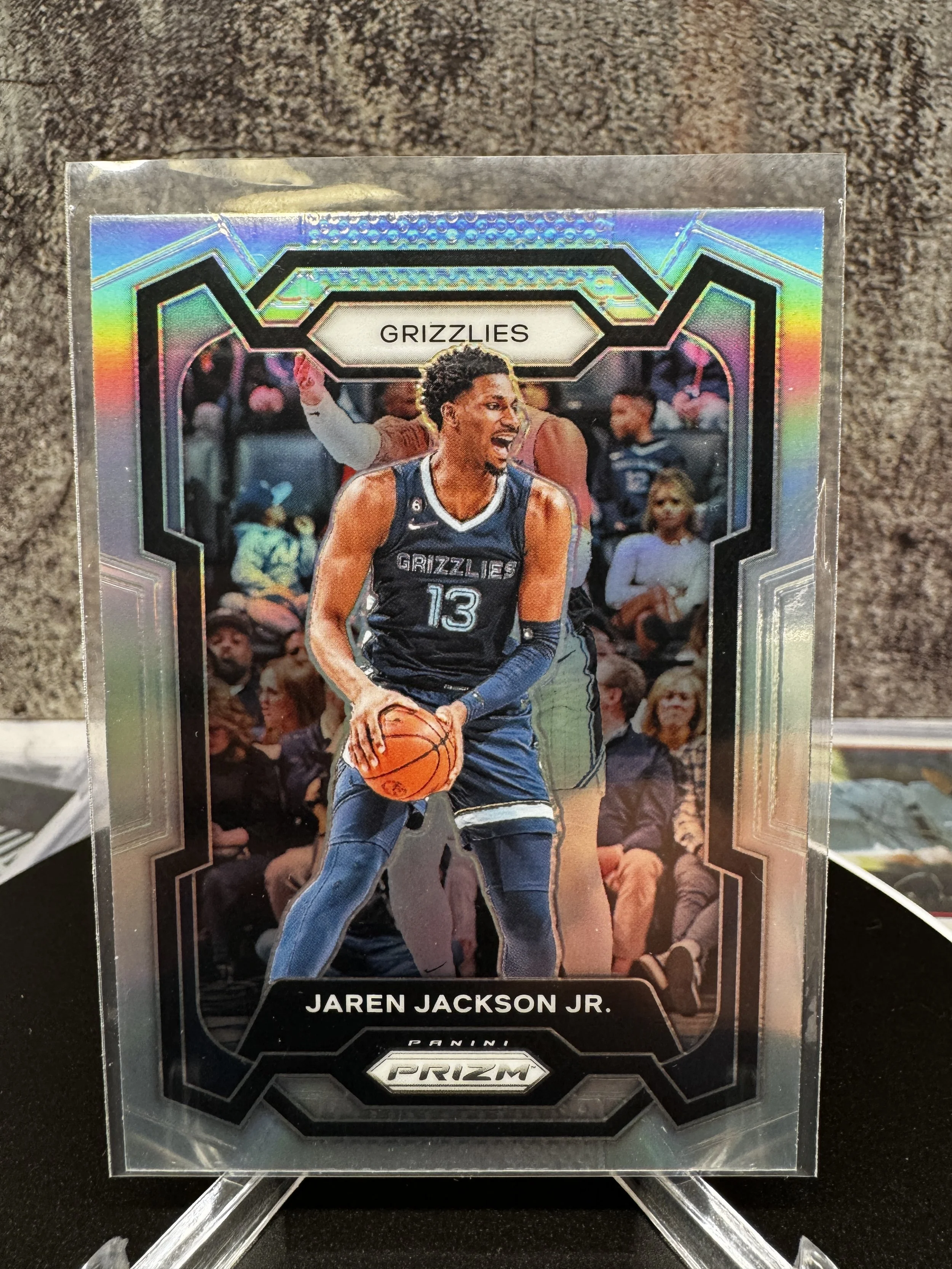
Scanner and iPhone: the same reflective card, different information
The scan recorded the Jaren Jackson Jr. Prizm card clearly, but the angled iPhone photo showed the rainbow finish that the flat scan muted.
An ordinary card and a thick patch card
The standard NBA Hoops card worked well in my scanner workflow. The thick patch card stayed in the phone photo process because it did not belong in the document feeder.

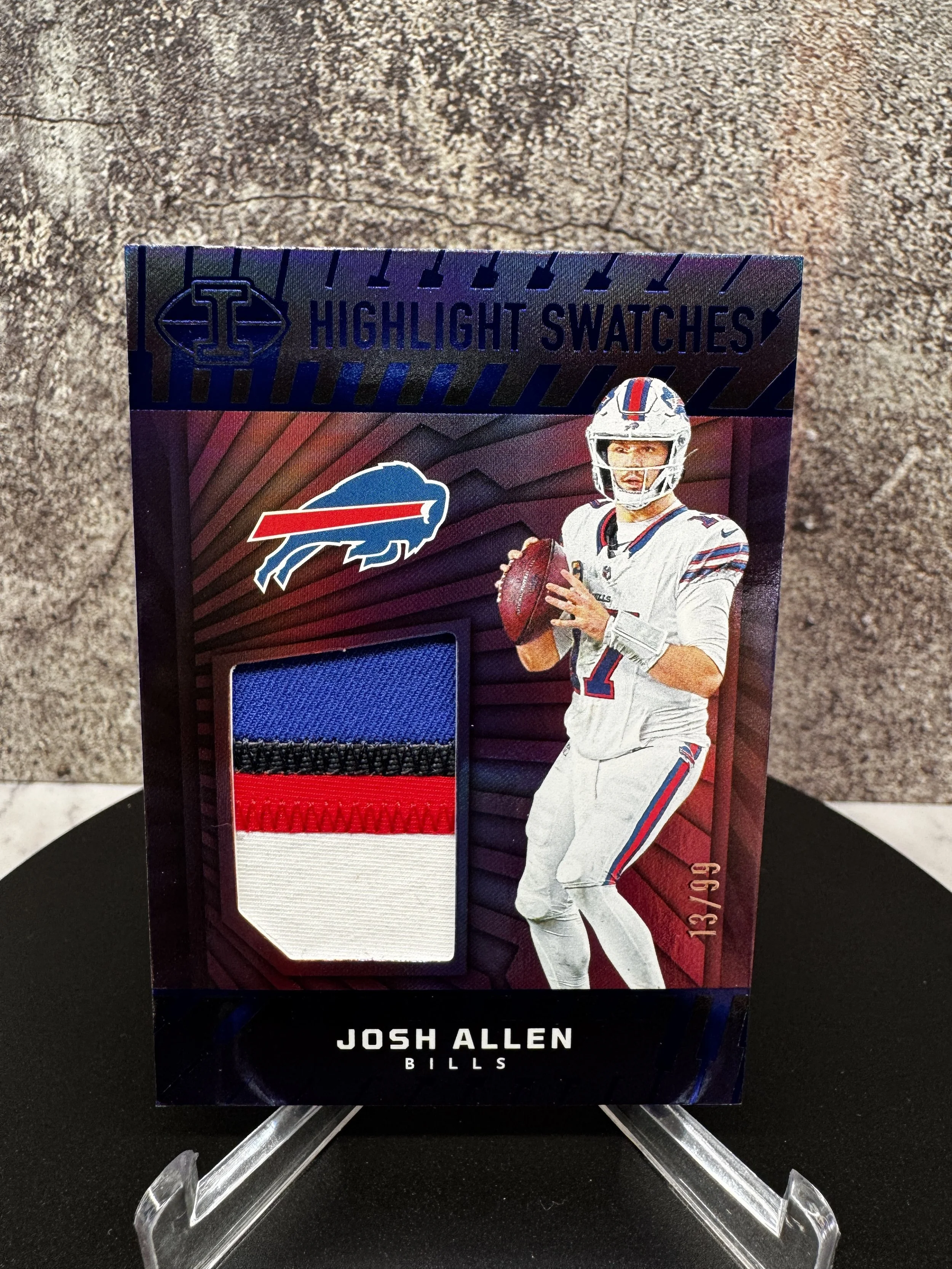
The ordinary card scanned cleanly. The thick patch card was photographed instead because it was not suitable for the document feeder.
So I never stopped using my iPhone. My process became a split workflow:
I scan batches of ordinary cards, including the front and back.
I photograph foil, refractor, patch, slabbed, delicate, and other cards that need angles or additional details.
For some cards I may use a clean scan for the basic front and back, then add an angled phone photo to show a reflective finish. The scanner and the phone are not competing tools anymore. They solve different imaging problems.
If you are curious what some of the finished listings look like, you can browse the sports card side of Next Level Collectibles:
Browse the Next Level Collectibles sports card shop
What I would research before buying a card scanner
When I bought the Epson, I mainly wanted to know whether a scanner could save me time. Now I would ask more specific questions before choosing one.
1. What will actually travel through the scanner?
There is a major difference between a document, a raw card, a card in a penny sleeve, a thick memorabilia card, and a slab. I would check the manufacturer's supported media and thickness limits, then compare them with what I actually plan to scan. I would not assume that a machine advertising support for business cards also officially supports sleeved collectibles.
2. What path does the card take?
I would look at whether the transport path is straight or bends the item inside the machine. A faster feeder does not help if I am uncomfortable with the way it handles a collectible. Card safety matters more to me than a headline speed.
3. How does the feeder separate unusual media?
The important question is not only how many sheets fit in the feeder. I want to know how it handles smooth penny sleeves, whether its detection features can recognize two cards feeding at once, and whether separation settings can be adjusted. My Epson has that detection feature, but sleeved cards can still require supervision one card at a time in my use.
4. Does it scan both sides in one pass?
Duplex scanning is one of the biggest time savings in my setup. I would still consider it essential for a workflow that captures the front and back of each card.
5. What do the scans actually look like?
Resolution alone does not answer this. I would test ordinary cards, dark borders, white borders, reflective finishes, and cards where surface condition matters.
Ricoh's Guide to Scan Trading Cards offers a useful manufacturer perspective on scanner types, card preparation, transport paths, and using 300 dpi as a practical starting point:
Read Ricoh’s Guide to Scan Trading Cards
Because Ricoh also recommends its own products, I treat that page as one research source. It is not a neutral verdict on the best scanner.
6. What does the software do after the scan?
Automatic cropping, rotation, ordering the front and back, file naming, image adjustments, and export options can save as much time as the physical scanner. I would want to see the real software workflow, not only the machine's speed rating.
7. Can I test it without gambling valuable cards?
I would check the return policy and start with inexpensive cards I can afford to use for testing. I would pay attention to scratches, sleeve movement, roller marks, edge contact, jams, two cards feeding at once, and whether the front and back stay paired correctly.
Those questions do not produce one universal winner. They help separate “this scanner is fast with paper” from “this scanner might fit the cards and workflow I actually have.”
What the scanner still could not solve
Once I could work through a group of cards in one scanning session, I had a new problem: a growing group of image files.
How would I know which front belonged with which back? How would those images stay attached to the correct listing? How would I preserve the order of the physical cards? And if I could create images in a batch, why was I still building listings one at a time?
The scanner made the imaging step faster, but the rest of the workflow had not caught up. I still needed:
A reliable way to identify each card.
A way to pair images with the correct item.
Consistent filenames and permanent SKUs.
A place to review item information and AI suggestions.
A way to create listings in batches.
Inventory records that continued to make sense after the card was listed or sold.
That is how one solution led directly to the next bottleneck.
I started looking more seriously at eBay's bulk listing tools. The listing flow inside eBay that uses AI was useful, but it was not consistent enough for the way I wanted to work. I believed the CSV upload template could give me more control.
I just could not get it to work.
That became the next problem in this series. It was the point where a faster image process began turning into a much larger system.
My verdict after living with it
I am not saying every seller needs an Epson ES-400 II, or even that a scanner is the right answer for every collection. There are several ways to solve the same problem.
The Epson was what I bought when I needed a practical first step beyond photographing every ordinary card with my phone. It produced consistent images of the front and back, made batch work possible, and taught me what I would want from the next version of the workflow.
It also taught me its limits. The feeder can pull two cards in penny sleeves at once. Some finishes look better in angled photographs. Thick, slabbed, delicate, and more valuable cards need a different path. Feeding cards one at a time can become its own bottleneck as volume grows.
So my answer is not simply “buy a scanner.” It is: a scanner can remove a real imaging bottleneck, but the right machine depends on what you collect, what you are willing to feed through it, what image quality you need, and how much supervision the workflow requires.
The Epson ES-400 II was the scanner that got my workflow moving, not the scanner that finished it. That distinction matters.
The scanner did not build my system for me. It removed one bottleneck, made the next one impossible to ignore, and gave me a reason to keep building.
Related: Why I Started Selling Collectibles
Double-click to edit...
